
Category: Youtube Videos

This is where I house my YouTube videos.

  • Halo 3 ODST on PC is the Ultimate Halo Gameplay Experience

    Halo 3 ODST on PC is the Ultimate Halo Gameplay Experience

    Becoming the Rookie | Halo 3 ODST PC Remastered (Gameplay)

    Halo 3 ODST is a game that sets a precedent for future games.

    It’s the harbinger of Halo Infinite–that game that got delayed and couldn’t make it to the Xbox Series X launch? Yup, that one.

    I talk about it in my Xbox Series X Unboxing video. You can check it out by clicking here to get caught up!

    It is a shame that it wasn’t ready for prime time but at least we have Halo 3 ODST gameplay to keep us entertained!

    Halo 3 ODST is my favorite Halo game. It took a chance and did things that other games just weren’t doing back in 2009.

    Halo 3 ODST Time Stamps

    Let’s orbital drop into some Halo 3 ODST gameplay and see why Halo Infinite has got a lot to live up to.

    When Master Chief Calls, You Answer

    When Master Chief Calls You Answer
    I got John 117 on speed dial via my Razor Flip Phone, yeah I know I’m pretty cool

    But before we get to the gameplay let’s review some background information on Halo 3 ODST as a whole.

    You take on the role of the Rookie, a recruit in the Orbital Drop Shock Troopers (ODST) ranks whose first mission was to drop into New Mombasa.

    The covenant comes to glass the planet as you drop in and you get separated from your crew.

    So basically the Rookie has three jobs to accomplish throughout the game.

    • Find what happened to your crew?
    • Discover what happened to the city?
    • And piece together what the hell is going on?

    All of this and more is answered throughout the game.

    The Orbital Elevator Falls on New Mombasa

    Starting as Dutch we jump right into blasting through some covenant on the beach and tear through some wraiths.

    We’ve got brute choppers and everything trying to stop our warthog from making it to the orbital space elevator.

    The important thing to note is that I do have the I Would Have Been Your Daddy (IWHBYD) skull turned on.

    So we do get some humorous language throughout the episode that you would never hear otherwise.

    I was really glad to see that the game just came with all the skulls unlocked from the start rather than having to unlock them all manually.

    The game is all about the player trying to piece together the mystery of what happened to the Rookie and his ODST crew.

    Hunter Armada as the Rookie
    The Rookie is the strong silent type, basically the opposite of me

    You are not a Spartan, you are an ODST, a difference that should not be taken lightly.

    Spartans are giant, hulking, super-soldiers while the ODST is more like the universal soldier that goes in and gets things done.

    Both have their places in the Halo Universe but I think the ODSTs are way cooler than any Spartan could hope to be.

    After a few firefights, we move onto the space elevator, which is sadly taken down by the covenant, and make a mad dash for the level exit.

    We roll the warthog through the battlefield and fall off a cliff to end the level. This brings us back to the present to see what the Rookie is up to.

    The thing to take note of is that this sequence was in the past and the Rookie is in the present. A conundrum that I can explain…

    The Rookie Verses New Mombasa

    We join the Rookie as the world gets a little brighter but we still need our night vision.

    The first thing to note is that this game has a map, which is an insane asset for a Halo game.

    Halo 3 ODST Map
    It’s been done before Halo Infinite made it cool

    If you thought Halo Infinite’s map was crazy… well, it’s been done before.

    Now we can choose our next mission from a few different options and then move around the open-world city to get there.

    The game is linear, but you can choose how you want to piece the story together and what missions to do in what order.

    New Mombasa is big and there’s a lot to do and discover while fighting the covenant and brutes throughout.

    So, we set a waypoint and move out.

    The city was designed with little mechanics where the game tells you how to get around. These can be anything from car horns to phone booths helping to navigate you.

    This was insane to think about back when Halo 3 ODST came out; games today do this kind of world-building all the time. But back when this launched it was jaw-droppingly cool.

    We find a phone ringing and gather an audio log we can listen to on our way to the objective.

    Pressing forward through some covenant, we end up at the ONI building to see that it is on fire.

    Time to see what happened to this building as well as the bridge

    Defending the ONI Building

    We once again play as Dutch and start by arming some bombs on the bridge.

    The Orbital Drop Shock Troopers are cool and here’s what they got:

    • Humor
    • Class
    • Style
    • And an incomparable badass-ness

    Arming the bombs and getting a safe distance away, I learn that the AI that runs the city is named Vergil.

    We run up a ladder and make the bombs go BOOM to help stop the covenant advance.

    Halo 3 ODST Bridge Explosion
    That’s a good explosion right there

    After taking out the bridge, we retreat into the front yard of the ONI building and fight wave after wave of the covenant before we have to hunker down inside.

    From here we take control of a turret and decimate everything that comes our way.

    Once the stragglers are taken care of we take a very unsafe elevator ride to the top of the building to hold out until a pelican can come to the rescue.

    It’s just a few more enemies to take out before we’re at a safe distance and destroy the building the covenant was so keen on taking control of.

    Vergil ONI Building Explosion
    Vergil is not a fan of property damage

    Once More Unto the Rookie

    Going back to the Rookie, we get a notification that a supply cache is now available. Time to make a beeline right to it!

    Grabbing a few good weapons–like a sniper rifle–we are now fully prepped to continue through the city and onward to the final mission.

    Some brutes and grunts try to stop us but they are no match against our new arsenal, as we now can tear through everything in our path with ease.

    We get to a creepy building filled with dead bodies and we make our way to the last mission. Time to try to figure out just what’s going on.

    Tank You, Tank You Very Much

    We move onto the final part of the episode where we take control of Mickey 90 minutes after the start of the game. We also get to drive some Scorpion tanks.

    This mission is pretty straightforward: just fight your way forward and kill everything with a tank.

    It’s a ton of fun–and oddly difficult considering the tank handicap–but it’s easy mode.

    You go through the city in daylight so you can see the city has some life rather than pitch-black darkness.

    It allows you to appreciate the city in a way one cannot do at night. Even while everything is exploding.

    Once we get to the end of the mission we just need to defeat a few wraiths and meet up with our squad to call it.

    Is Halo 3 ODST Amazing?

    Hunter Armada Giving Final Gameplay Thoughts on Halo 3 ODST
    Halo 3 ODST is a superb game and easily my favorite in the Halo lineup

    Halo 3 ODST is a game that impressed back when it first came out. It still impresses to this day.

    It is hands down my favorite Halo game. It has such a unique take on the series that it is nothing less than memorable.

    Halo Infinite has a lot to live up to with Halo 3 ODST casting a shadow.

    It feels like the first steps towards Halo Infinite and Bungie took a risk that paid off.

    I think the game is amazing, a true classic. If you have Game Pass don’t miss out on this incredible Halo game.


    Is Halo 3 ODST Amazing

    Check Out if Other Games Are Amazing!

  • Tony Hawk Pro Skater (THPS) 1 and 2 Remake Gameplay

    Tony Hawk Pro Skater (THPS) 1 and 2 Remake Gameplay

    DOING SICK TRICKS in tony hawk pro skater 1 and 2 remake (THPS) gameplay

    Tony Hawk’s Pro Skater 1 + 2 Remake (THPS) is what every remake should strive to be. 

    It’s fast, fun, controls are perfect and it has that nostalgia factor brought into 2020.

    It feels like a game ripped from time and polished to a shine without breaking what made it so special all those years ago.

    When I found out we were getting a proper THPS game rather than their last attempt.

    I was overjoyed to put a deck below my feet and start grinding some rails. 

    The last THPS game I played was Tony Hawk’s Project 8 and I enjoyed that game.

    Let’s see why this remake is so amazing.

    Breaking Down the THPS Gameplay

    Take a look at the statistics below for a quick breakdown of what I encountered in my let’s play.

    • I bailed a lot, like an embarrassing amount
    • Skated in 3 locals
    • 5 Skill Points Acquired
    THPS Gameplay Statistics
    I feel like bailing a lot is how you become a true skater, at least in my experience

    THPS Video Time Stamps

    Let’s do some kickflips and dive into some THPS gameplay.

    An Ode to Skateboarding in Fail Minor Featuring THPS

    Starting by trying to beat a heat challenge was probably not the best choice to start this let’s play.

    I quickly learned that I do have the dexterity I had back in the Playstation 1 days when I played a lot of Tony Hawk.

    I discover the following:

    1. I can’t do the challenges
    2. I can’t do the times
    3. I can’t do the high-scores
    4. I can’t unlock everything
    5. I can’t get that skill point up there
    6. I can’t get up there
    THPS Can’t List
    It may sound like I’m complaining but in reality, I’m just really bad at THPS

    Even with all that stuff bogging me down I still have a ton of fun playing THPS.

    I fall all over myself, don’t get high scores, have to redo the heat way more than should be allowed.

    But I have a smile plastered to my face the entire time I’m skating around and doing crazy tricks.

    At the end of the day, the game is there to make sure you the player has a ton of fun.

    From getting skill points to smashing your head right into the pavement.

    You’ll keep coming back with many a restart to get that picture-perfect run and clear a few tasks.

    It takes several tries but eventually I become one with my board and manage to get in third place.

    Getting a Bronze in a Heat Challenge
    Gold, Silver, and Bronze feels good no matter which one you end up withGold, Silver, and Bronze feels good no matter which one you end up with

    With that perfect victory, we take a taxi over to NY City to skate around and dodge some taxis.

    NY City is a Skaters Nightmare

    Moving straight over to NY City we take a look at some of the tasks that await and get right to skating.

    One of the best parts of THPS is going through a level for the first time and just getting a lay of the land.

    Figuring out where everything else so you can plot out your course of action to maximize your runs with the 2-minute time limit.

    Using the first run I go around NY and try to collect all the letters of S-K-A-T-E which I manage to do alongside getting the high score.

    High Score in NY City
    I got the high-score, go me, yay me

    Right after I do manage to spell S-K-A-T-E and move onto the next run to go after the subway cards.

    But first I manage to get run over by a taxi and collect a Skill Point, then it’s time to collect the 5 subway cards.

    They allude to me for a bit but after some trial, error, and getting tons of speed I get them all and open the final area of the map.

    After jumping over 3 fire hydrants I go up to the subway station and grind over to where the secret tape is hiding.

    It takes a few attempts but I manage to get the secret tape and we move onto some learning by heading over to the School.

    Shredding at the School

    This is definitely where I need to use everything I’ve learned to get tasks completed.

    From kickflipping over the roof gap to grinding some long rails.

    It’s all about trial and error, dodging golf, and grinding call rails.

    What is a call rail you ask? I still have no idea, I spent way too much time grinding rail after rail to only eventually give up because I couldn’t find it.

    I discover that the school is open and you can go into it, after hitting the door numerous times.

    Using a Door is hard in THPS
    After numerous attempts, I have indeed discovered that doors are Skaters natural enemies

    I hit the school’s pool and quickly realize that I’m just not accomplishing anything.

    Thus I decide to wrap things up.

    Is THPS Amazing?

    Hunter Armada Giving Final Gameplay Thoughts on THPS
    THPS is a good game and I’m very glad this is a solid remake

    Tony Hawk’s Pro Skater 1 + 2 Remake (THPS) is a remake of two classic games that just showed how to make games fun.

    The 2-minute time limit may be a little dated but it’s always fun to try and get as much as you can be accomplished in the time limit.

    The games play amazingly with the controls as smooth as butter and as responsive as they need to be.

    If you screw up that’s because you couldn’t hit the buttons properly the game is so polished it’s always on you.

    Between a ton of content, money to spend in the shop on customization, and a nice graphical facelift, THPS shreds.

    This is how you create a remake of a classic game and I hope other developers take note.

    It’s fun, fast, and extremely well made. I have very high hopes for future Tony Hawk games now that the bar has been set so high.

    Is THPS Amazing

    Check Out if Other Games Are Amazing!

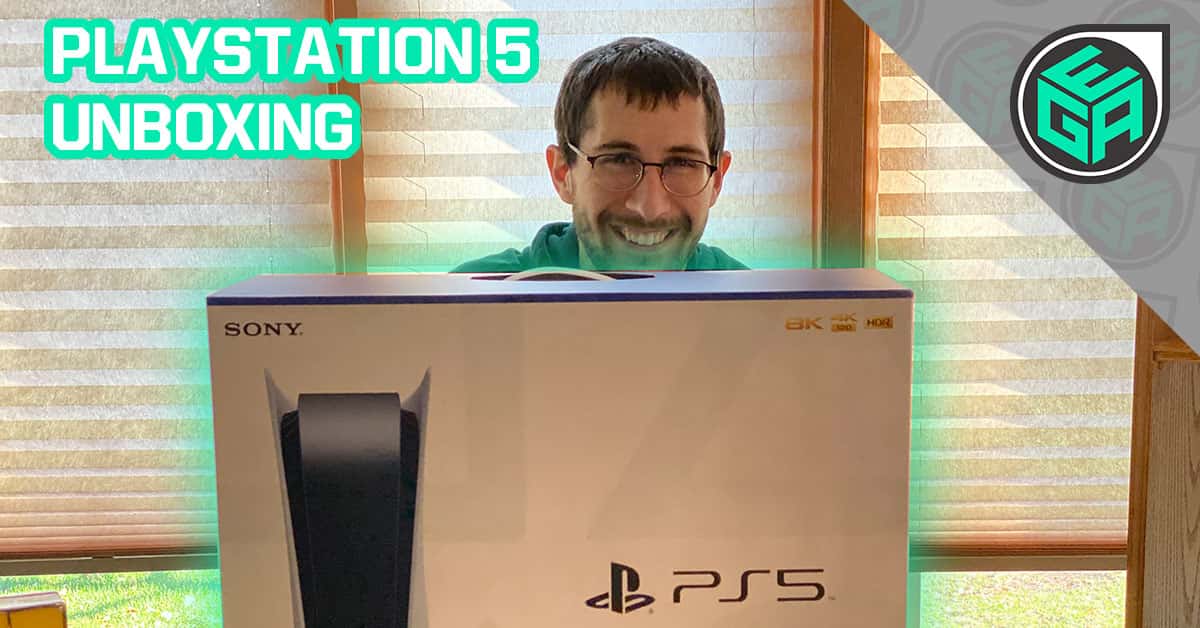
  • Unboxing the PlayStation 5 (PS5): A Dream Come True (First Impressions)

    Unboxing the PlayStation 5 (PS5): A Dream Come True (First Impressions)

    PlayStation 5 Unboxing | First Impressions + PlayStation 4 Pro Comparison

    Unboxing the PlayStation 5 is a wild ride from start to finish.

    It dazzles you with a unique, attention-grabbing box that keeps you guessing about what is inside.

    The PlayStation 5 is a masterclass of a console, really making you feel like the next 7 years are going to be groundbreaking.

    This is shown from the moment you open up the box and then showcased by playing Astro Bot, which is pre-installed.

    Let’s get right into unboxing the Playstation 5 and see why this console is so amazing.

    PlayStation 5 Unboxing Video Time Stamps

    PlayStation 5 Box Overview

    The Playstation 5, from the get-go, lets you know what you’re getting into with a clean front.

    I love the triangle, square, circle, plus sign behind the PlayStation 5 console and DualShock 5 controller. Little things that make the design cohesive to the brand are easy ways to tell an item is of quality. 

    We also have the 4K 120FPS showing as 8K and HDR in the upper right.

    Front of the PlayStation 5 Box
    The front of the box is very clean making it just nice to look at

    Looking to the left side of the box we have the PS5 logo as well as everything that comes packed inside.

    Inside the box is the PS5 console, the DualShock 5 Controller, mounting stand, HDMI cable, AC Power Cord, USB Cable, Printer Materials, and Astro Playroom pre-installed.

    Left Side of the PlayStation 5
    I like how the triangle and circle bleed over to the left side of the box

    On the back of the box, we can see a nice big picture of the PlayStation 5 and the DualShock 5.

    We can also see it has 825 GB in hard drive space, lighting speed, breathtaking immersion, and stunning games!

    You’ll be able to put in an M.2 Drive in the future to expand the storage but Sony has yet to announce anything specific.

    Lighting speed talks about how fast this console loads video games and apps. It’s insane, just unreal. 

    The immersion is on another level using the 3D audio, I’ve never heard anything like it; impressive.

    The stunning games are no joke. All of the launch games are true showcases of just just how powerful this console is.
    If you have PS Plus then you get a big library that includes Sony first-party games, such as Ratchet and Clank.

    Back Side of the PlayStation 5
    They want you to know this is a PlayStation 5

    The right side of the box has differently angled photographs of the console and DualSense controller.

    Right Side of the PlayStation 5 Box
    Plain simple and elegant

    No, that the box has been covered, let’s unbox this thing and get into the console itself!

    Unboxing the PlayStation 5

    Unboxing the PlayStation 5
    1 piece of tape is all that held me from getting to the console

    I had to stand up, put the box on the floor, and pull the console out. The box is just that big! It even weighs around 15 pounds.

    There’s a box within a box and it holds everything we will need.

    PlayStation 5 Accessories

    PlayStation 5 Accessories
    Everything you’ll need in one nice little box

    We got the instruction manual, the safety guide, the AC Power Cable (No Power Brick is awesome), USB-C for charging the controller, the PS5 stand, an HDMI cable, and the DualShock 5.

    The PS5 stand is impressive; it’s hefty with a solid structure meant for both horizontal and vertical standing.

    No matter your entertainment center, the PS5 is going to fit nicely and look incredible.

    The DualShock 5 (DualSense) Controller

    DualShock 5 Controller
    The new DualShock 5 has to be held to be believed

    The controller feels incredible when you hold it. It forms perfectly to the hands so gameplay will be a comfortable breeze.

    The touchpad is still front and center and it has a nice diagonal cutout that just looks cool.

    Also, the PlayStation button is nicely etched into the controller, plus it has a nice push-in effect.

    I like the sleek, white look with the black contrast. Every detail within this generation is pleasing to the eye.

    The mute button is a great addition and something well thought out.

    The triggers feel great and even better once you’re playing video games!

    Comparing the DualShock 5 (DualSense) the DualShock 4

    Comparing the Dualsense to the DualShock 4
    They look very similar but the internals are where the magic lies

    The most noticeable difference is that white and black contrast on the new DualSense.

    The DualSense just feels better than the DualShock 4, it has a better grip and fits in your hand nicer than its predecessor. 

    I’ve been using the DualShock 4 for the last 7 years and it’s nice to have something that feels evolved.

    The other key difference is the Playstation button is no longer a circle; it’s a cut out of the PlayStation logo, so it can be harder to press.

    The D-Pad and the Share/Menu buttons are in the same place.

    The key difference is the internals, that’s what makes this controller so unique and will vastly improve gameplay.

    I also love how the lights are much more subdued on the side of the touchpad rather than a big bar across the top that annoys you. It’s much more subtle.

    Let’s get into the PlayStation 5 console itself!

    The PlayStation 5 Console

    Front of the PlayStation 5
    It’s a V for 5 with a bulge for the disk tray, very nice!

    The PlayStation 5 is crazy looking, just awe-inspiring. You have to see it in person to understand just how insane this console truly is.

    It’s a breath of fresh air in the electronics space with it being so freaking rad looking. It is just so different from every other console, Sony or not. It makes you wonder what the hell it even is if you didn’t already know.

    Ultimately it looks like a concept for a game console, not the final product and I’m just so glad Sony had fun with it!

    On the front, we have the disk tray, power button, disk eject button, a USB-C slot, and a USB slot.

    PlayStation 5 Side of the Console
    The PlayStation logo cut out on the side is just beautiful

    The side of the console is nice with the logo cut out. Sony truly planned for it to look great whether one chooses to stand it up or lay it on its side.

    PlayStation 5 Back of Console
    Pretty standard stuff back here to plug in and get gaming

    We have the power connector, HDMI in, Ethernet cable, and two USB inputs.

    This is also where the stand is placed via the nice button inlay to help guide you.

    This is a very tall console, no two ways about it, with a hefty weight to boot.

    The buttons click-in rather than being composite.

    Comparing the PS4 Pro to the PS5

    PS4 Pro next to the PS5
    This is 7 years of engineering right here

    These are two very different consoles no matter vertical or horizontal.

    The PS4 Pro is matte black and on the smaller side, while the PS5 just towers over it.

    Again it comes down to the difference in size and scope for these two consoles.

    The PS4 has a nice shiny logo but the PS5 logo is cut out of the casing.

    The big takeaway from these two consoles is that there is no more optical out on the PS5.
    This is a shame because that was useful on the PS4 Pro, but with the Pulse 3D Headsets, you won’t miss it.

    Putting on the PlayStation 5 Stand

    PS5 Stand Horizontal
    It’s easy to put on and looks great doing it

    Putting on the PS5s stand was surprisingly easy; you just match the stand to the squares that are cut into the PS5.

    This allows for vertical or horizontal and it looks fantastic either way, just do what’s best for your entertainment system.

    Before I put it on the stand, I didn’t realize the disk tray was at the bottom, but after using it there are no issues.

    Final Thoughts on the PlayStation 5

    Final Thoughts on the PlayStation 5
    From the crazy look to playing amazing games, the PS5 nails everything perfectly

    I am so impressed by the PlayStation 5, this is truly a console that was worth the wait.

    From playing games to simply looking at the console’s design; it is evident how much thought went into its creation.

    It is a premium console and it makes sure you know that from every aspect, I am so overjoyed to jump into playing it.

    I’m going to go play some Miles Morales and just look at the console in awe!

    Check Out the Other Amazing Unboxings!

  • Xbox Series X Unboxing and First Impressions (It’s Surprisingly Heavy)

    Xbox Series X Unboxing and First Impressions (It’s Surprisingly Heavy)

    Xbox Series X Unboxing – First Impressions and Xbox One Comparison

    Unboxing the Xbox Series X is like opening a Christmas gift even though you know what’s inside. 

    From Master Chief on the box to the incredible design, everything is built to make it feel like you’re holding something truly special.

    I was surprised by just how heavy the Xbox Series X was; the box hides the overall weight of the console.

    Let’s unbox the Xbox Series X and dig into what you can expect from the latest and greatest from Microsoft!

    Xbox Series X Unboxing Video Time Stamps

    Xbox Series X Box Overview

    The first thing you notice is that the box has a nice decal that showcases the console’s signature design.

    Microsoft wanted to make sure that the packaging was eye-catching and slick. I would say that they accomplished that mission.

    The front has the Xbox’s top with the green vents, the Xbox logo, Series X logo, 4K 120FPS, and stating its 1 TB SSD Drive.

    Front of the Xbox Series X Box
    The Xbox Series X front is great with the nice green vents pulling your gaze

    The sides are standard and what one would expect: information and a picture of the console. I’d imagine this is for stores to maximize their shelf space.

    Left Side of the Xbox Series X Box
    It’s just the same as the front of the box, nothing exciting

    Moving on to the back of the box, I am immediately reminded that Halo Infinite was delayed.

    It blows my mind that Halo’s delay was so rushed that Microsoft didn’t have time to redesign the box.

    I mean, it still looks cool but you can’t help but be disappointed that the console doesn’t have a show stopper of a game to get you hyped. Nobody likes a tease.

    So, we got Master Chief saying “Power Your Dreams” which is their big tagline.

    Other box features include a few icons stating it’s the most powerful Xbox console, Velocity architect, play all your Xbox generations of games, and Game Pass.

    This should be the most powerful Xbox console to date by default but they feel the need to hammer it home, which is fine.

    The Velocity architect is a fancy name for the internal SSD.

    Back Side of the Xbox Series X Box
    Master Chief is sad he’s not in the launch equation

    On the right side of the box, we have all the information you could ask for in a single space.

    From the 4K 120 FPS, HDR, the Velocity architecture, and 4K blu-rays.

    The last bit is that it has the console, a controller, 2.1 HDMI cable, and wireless connectivity.

    Right Side of the Xbox Series X Box
    Everything you’d want to know is on the right side of the box

    Enough of the box let’s tear this thing open and get a look at it!

    Unboxing the Xbox Series X

    Unboxing the Xbox Series X
    I like how they did the tape around the box

    Taking off the tape is honestly kind of fun. They made it nice with little arrows and everything you’d need to know to open it correctly.

    It’s like opening a nice present. It just feels expensive and the “Power Your Dreams” hits you right in the face with a nice cover.

    Before we get to the console we have to see the 2.1 HDMI cable and the power cable.

    I am so glad that Microsoft made the power brick internal. It is just so much nicer to have a small cable than a big brick. This is especially true for setup in an entertainment center.

    After some warranty agreement paperwork, we can dig into the controller and see if there are any improvements over its predecessors.

    The New Controller

    Controller Lighting Up
    The controller isn’t different but it does feel nice to hold

    The controller’s weight is nice but I can’t help but be disappointed that it calls for batteries. Come on, it’s 2020 and we don’t have a built-in charging solution for a $500 console?

    Despite that, I love the matte black color, the thumbsticks feel nice, and the addition of new triggers.

    The updated D-Pad is fantastic and plays games like Tetris Effect: Connected fluidly.

    Comparing the New and Old Xbox Controllers

    New and Old Xbox Controller
    The differences are so small that you’d swear it was the same thin

    The difference is notable in the updated D-Pad, but everything else is fairly similar.

    I like the slick black but really when you hold them next to one another you cannot tell much of a difference.

    If you were blindfolded the D-Pad would be the giveaway but otherwise, you just wouldn’t have any idea that there was a new controller.

    Besides that, this will be my go-to controller.

    Xbox Series X Showcase

    The first thing I noticed is just how heavy this console is. It seriously is crazy heavy for such a small form.

    Also, the packing is nice but it’s hard to tell which side is up. I fumbled around before finally unwrapping it.

    The only way I’m able to tell which side is up is by touching the top and bottom of the console to feel for the vents.

    Xbox Series X Unwrapping
    It feels like you’re opening a Christmas present

    From the get-go, the console is just a giant box with the Xbox logo button at the top.

    Nothing too wild as it stands but you can’t help but be impressed with how awe-inspiring it is. I am such a big fan of the clean look.

    It has a disk tray, disk remove button, wifi button, and the power button on the top.

    Front of the Xbox Series X Console
    It’s just so incredibly clean and will pair well with an entertainment system

    The button pushes in which is nice rather than a button you slide your finger over.

    Xbox Series X Green Vents
    I like the green vents, really appealing

    On the back, we have the HDMI Port, Expandable Storage (Even if it is crazy expensive), HDMI in only, Ethernet port, and two USB ports for more external drives.

    Xbox Series X Back of Console
    Everything you’re gonna need to get set up and start gaming

    The thing about putting it on its side is the Xbox logo is wrong and can’t be turned, real bummer.

    The Xbox logo on the side of the console shows that I have it positioned correctly.

    It’s a really big black box where the air flows out the top and is comparable to a high-end PC, which is just awesome.

    Comparing the Xbox Series X to the Xbox One

    Xbox Series X next to the Xbox One
    They weigh about the same which is surprising given the different form factors

    I have my original Xbox one ready to go and I put them side by side to get a look at what has changed in 7 years.

    They are about the same width when on their side or even standing up but you can see the 7-year difference in terms of design.

    The new Xbox just demands attention and wants you to play video games while the Xbox One looks like a DVD player. And yet it can’t even play 4K blu-rays.

    I got a lot of use out of the Xbox one but the new Xbox does everything it can do… and do it better.

    Final Thoughts on the Xbox Series X

    Final Thoughts on the Xbox Series X Console
    It certainly is a nice designed piece of hardware

    I’m really impressed by the overall design, look and feel of this next-gen piece of hardware.

    Microsoft pulled no punches and made something hefty that’s going to look great in any entertainment space.

    From the nice green on the top vents to the solid black design, it just feels like an expensive piece of hardware that’s going to give you hours of fun.

    The Xbox Series X is a well designed new console that is set up to allow you to enjoy every game.

    I’m going to jump into Game Pass and play some Titanfall 2!

    Check Out the Other Amazing Unboxings!

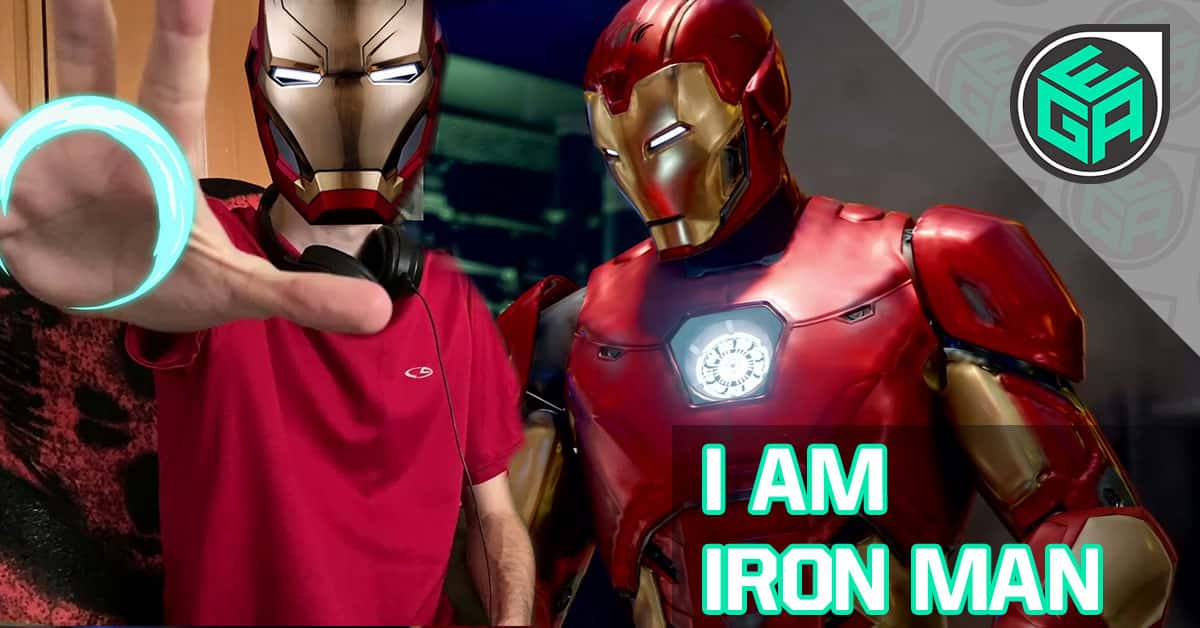
  • Becoming a True Avenger in Marvel’s Avengers

    Becoming a True Avenger in Marvel’s Avengers

    I am Iron Man in Marvel’s Avengers (Gameplay and Impressions)

    Marvel’s Avengers is a game that just feels like it is stuck in the past and brings nothing new for the future of gameplay.

    The game starts strong, comparable to a game like Uncharted with its level of polish and showmanship. We have heard it all before: “Don’t judge a book by its cover”. Well, take that to heart here because the innards of this game don’t live up to the initial impression. 

    The gameplay is shallow, the missions are a drag, and the level of grinding that just isn’t fun or rewarding for the player. The average gameplay time (for just story-focused missions) is about 12-15 hours. But it’s just all the same. Missions have a lack of variety and no substance to make up for the mundane. The blatant repetitiveness was a letdown considering how highly acclaimed the series is. It just does not feel like a game that is worth the $60 price tag.

    Breaking Down the Marvel Avenger’s Gameplay

    Take a look at the statistics below for a quick breakdown of what I encountered in my Let’s Play.

    • 4 Avengers Lost
    • 2 King of the Hills Toppled
    • 1 Hulk Chest Opening via Foot
    Marvels Avengers Gameplay Statistics
    Yes, the Hulk opens the chest with his feet and it’s my favorite part of the game

    Marvels Avengers Video Time Stamps

    Let’s dive into some Marvel’s Avengers gameplay and break down my critique.

    The One and Only: Iron Man

    On a surface level, the game design is great! Controls are also precise and responsive. And if we learned anything from Battletoads last week… it’s that controls are the defining factor of whether a game will be a rage-play. Marvel’s Avengers was a breath of fresh air in this department. 

    The developers put a lot of time and effort into crafting the elements of graphics and effects. Each Avenger is represented just as they would be on a theater screen. 

    Playing as Iron Man is a ton of fun! With flying abilities, gameplay allows you to soar around the level and take down enemies. He is geared up with rockets and lasers for battle sequences, efficient in taking out the level’s robots.

    The one thing I want to make blatantly clear: you will have seen the entirety of this game simply within one minute and fifty-five seconds of the video.

    And I mean that.

    Iron Man Fighting with 60+ Hours
    60+ Hours of hitting robots

    The game gives you bits of information throughout battles, such as the number notifications that pop out of enemies to signify just how strong your hits are. Kind of a similar mechanic used in Borderlands. There’s no denying that big numbers make you feel good but if you sit down and think about it, you’re just hitting one button until you win.

    Throwing in some throws doesn’t add much to the overall package.

    Early on we see the King of the Hill style of mission where you just sit in a circle until a bar fills and the mission completes. After that’s done, you take out a bunch of robots and receive the HulkBuster Armor and clear out the room to finish the mission.

    War Table

    Taking a look at the War Table we see that the game is dulled out via missions that you select from a menu. Pictured below is just the War Table but the jet itself is a massive ship you can walk around in and interact with. It acts almost like a break room where players can stop between missions if they choose to do so.

    I’m personally a player that just wants to go so the simplicity of just having the War Table would be fine by me.

    Marvel's Avengers War Table Mission Select
    This War Table is 100% easier to choose a mission and get back into the gameplay

    After some explanation and a look through, we’re off on a Hulk Iconic Mission which is a specific mission for Hulk to get him some better gear. We build Hulks loadout and jump right back into the gameplay.

    Hulks Iconic Mission

    As the Hulk we… Well, we hulk around. The level provided a chest and lots of things to HULK SMASH before we continue. 

    If you’re looking for something concerning Anthem or Destiny then this is going to feel extremely familiar as you fight enemies on the way to a marker.

    Running into a quick robotic mini-boss is no issue for the Hulk. Just a few Thunderclaps and some help from Iron Man is all it takes. These moves can be leveled up as the game goes on.

    Hulk ThunderClap Attack on Miniboss
    The Thunderclap is pretty powerful after you level it up a bit

    Moving forward into the facility, we have an elevator ride and then the mission continues. The mission takes us deeper into the facility with enemies scattered about. We come across a computer that needs to be destroyed, which leads to some of my heavier critiques. 

    If pressing a button until a non-moving object’s health bar goes down then this is the game for you. It pretty much is just this same thing over and over. For a series with so much acclaim, I had some hope that the game would live up.

    With the data centers taken out, we’re in the final room of robots and finish the mission once they’re beaten.

    At this point in the video, I take a quick minute to touch on details about why I do not think this game is worth it. Here they are below:

    Every single one of the Avengers plays the same, with very few differences to appease different playing styles. Iron Man and Thor can fly through.

    Button combos are copy and paste.

    Final rooms are essentially just a tough-it-out until the robots are all defeated. This shows just how bad the AI is at reviving the player as they’ll come close and then run away. This mechanic caused me to die a few times before actually being able to win.

    Otherwise, we just take out the robots and call this a successful mission. Next up is we look at the game’s character upgrades and jump into an Iron Man story mission.

    Marvel’s Avengers Upgrades Explained

    As you play through each mission you are rewarded with gears.

    Hulk Gear Loadout
    The gear just shows as a hologram rather than a piece of cool looking gear in the Avengers

    The truth is that this is nothing more than making a number go up and up. It gives you a false sense of progress that adds no value to the game. You may get stronger but the enemies level up alongside you, it doesn’t matter how strong you get if the game doesn’t make you feel like you’re getting an upgrade that gives you a sense of having a lead over an enemy.

    Since the gear is not displayed on the Avenger you get no sense of progress within the game, only the menus, which just isn’t fun. I wanted to build my Avenger’s look and feel but you only get one choice via costumes.

    Making a number go up without some kind of visual just dilutes the entire experience and forces the game to be interesting in other ways. Which is another downfall because the game drops the ball in picking up that slack. 

    If you’re looking for costumes that do change the look of the Avenger then you either have to play a ton of missions over many times or just drop real money.

    With that out of the way, let’s jump into an Iron Man story mission to reassemble the Avengers.

    Iron Man Story Mission

    We start in a city and get a glimpse of the open-world aspect in a big level like this.

    Iron Man Gameplay Icons
    They add a lot of objectives outside the main one, but unless you want loot there pretty useless

    I decided to ignore most of the side missions after I died attempting to grab a chest and just beeline right to the mission objective.

    This turns into another King of the Hill style objective. As I said before, reusing the same mission with 40 minutes of gameplay just isn’t a good look and boring overall.

    I take down a bunch of robots using Iron Man’s lasers and tools of destruction while holding the hill.

    Now I know this game was made to play with multiple people, but I’m someone who has a lot of time playing solo. I like to immerse myself in the game and become one with the character I’m playing as. But the game also Playing Marvel Avengers feels like something is missing when playing solo.

    Multiple Hunter Armadas Playing Marvel’s Avengers
    When you don’t have friends to play certain games with you, it’s time to improvise

    I wish this game was made with solo players in mind so everyone’s playstyle could be accommodated to, instead it feels like solo players got the short end of the stick.

    After taking out the hill we move into the facility and take out some orange glowing pillars and call this a mission.

    Is Marvel’s Avengers Amazing?

    Hunter Armada Giving Final Gameplay Thoughts on Marvel’s Avengers
    If you can’t tell I didn’t enjoy my time with Marvel’s Avengers very much

    Marvel’s Avengers is a game full of pitfalls that don’t live up to the Avengers moniker.

    It has a high-quality opening that baits you into thinking that this game is better than the sum of its parts.

    It hides the “Live Game” aspect that slowly becomes dull over a few hours of gameplay. 

    Mechanics, missions, and overall gameplay are entirely copied and paste.

    There’s nothing new here. It’s just a game to try and get money out of you for costumes and the promise of future updates.

    Right from the start, the game doesn’t add enough value or interest and then comes back to ask for more. You’ve got something you won’t have to worry about missing out on experiencing.

    Is Marvels Avengers Amazing

    Check Out if Other Games Are Amazing!

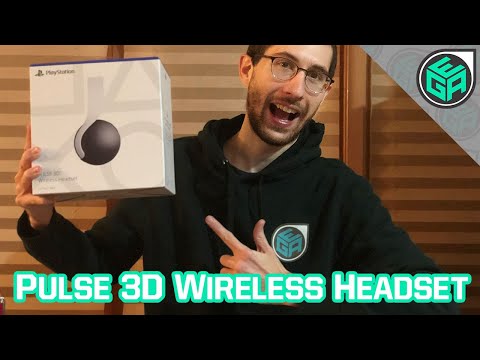
  • PS5 Pulse 3D Wireless Headset Unboxing and First Impressions

    PS5 Pulse 3D Wireless Headset Unboxing and First Impressions

    PS5 Pulse 3D Wireless Headset – Unboxing and First Impressions

    From the box to the actual PS5 Pulse 3D Wireless Headset, everything screams clean and striking.

    I like the look of the headset and after wearing them for several hours for testing I am happy with them.

    They sound incredible and comparable to my WH-1000XM3 Wireless Noise-Canceling Headphones which was shocking, to say the least.

    Seeing everything via a video or pictures do not do these headphones justice, they are masterfully crafted to handle even the longest gaming session.

    I’ve taken a crack at an unboxing video in the past but now I’m taking it to a new more professional level!

    Let’s unbox the Pulse 3D Wireless Headset and see why they’ll perfectly complement your brand new PlayStation 5!

    Pulse 3D Wireless Headset Unboxing Video Time Stamps

    Pulse 3D Wireless Headset Box Overview

    The first thing you notice right from the moment you see the box is just how striking it is.

    Sony didn’t hold back when designing this really high-end and visually appealing box.

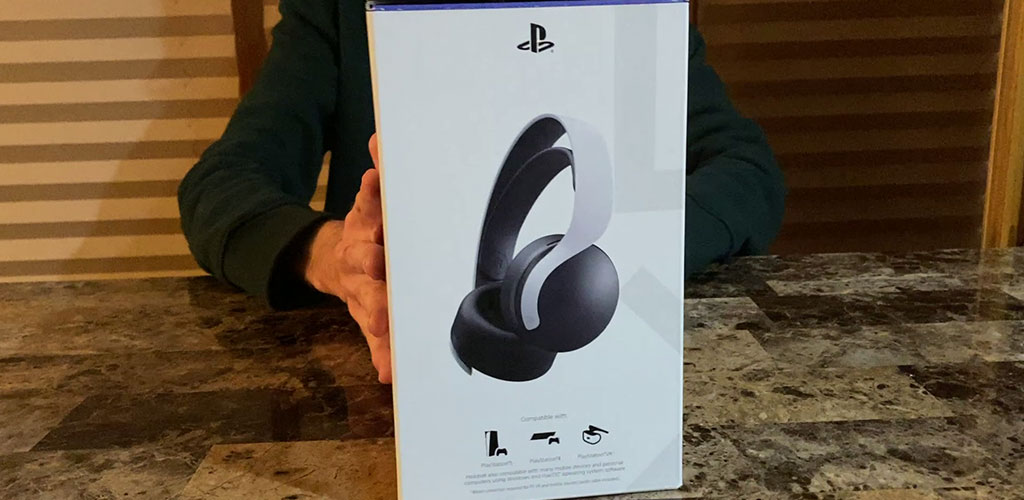
    The front has the classic square, circle, triangle, and signs with the headset nicely centered.

    Front of the Pulse 3D Wireless Headset Box
    The Pulse 3D Wireless Headset demands your attention right from the start

    Going to the side of the box you can see that it’s compatible with the PlayStation 5, PlayStation 4, PlayStation VR, Windows PC, and even Mac.

    This is thanks to the provided USB dongle that’s as simple as plug and play for wherever you want to listen.

    Left Side of the Pulse 3D Wireless Headset Box
    Sony lets you know upfront what you’re getting into

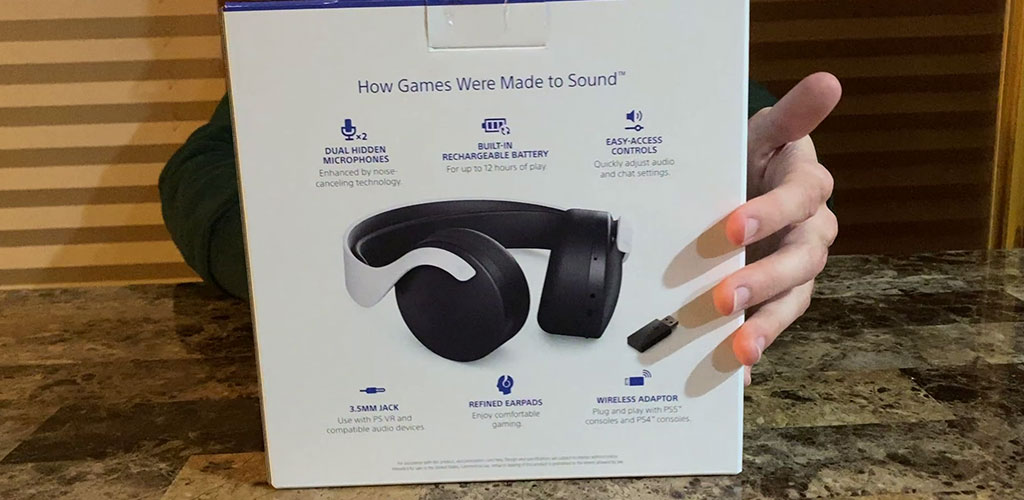
    Moving on to the back of the box you can see that the headphones bring a lot more to the table than your average pair.

    Back Side of the Pulse 3D Wireless Headset Box
    Everything you could ask all in one place

    The Pulse 3D Wireless Headset was designed to complement the PlayStation 5 and that’s just a fantastic approach.

    The microphone is built into the headset without the need for a mic jutting out the end. I am someone who appreciates this and hope other headphones follow Sony’s example.

    The headphones have 12 hours of battery life, which is fine for a $100 investment. Nothing jaw-dropping though.

    The controls are on the side of the ear cups and after a few minutes of use, I immediately learned where the buttons are. 

    They all have a different height to let you know what’s important and just running your hand along it will allow you to control everything with ease.

    It has a 3.5mm Jack that can be used to directly plug the headphones into the Playstation 5s controller or any receiver to match your preference.

    The refined ear pads are proclaimed to be comfortable and I’ll dig into this later on.

    Finally, we got the wireless adapter which again is just plugged and play, I was shocked how easy it was.

    Right Side of the Pulse 3D Wireless Headset Box
    3D Audio is something I’m interested in as I can’t hear it without a PS5

    On the right side of the box, we got the 3D Pulse claim to fame, the 3D audio.

    The interesting thing to note is that the box says that games must support the feature.

    Now I’d imagine that all Sony First-Party games will have 3D audio in them. 

    The bigger question is will Third-Party developers take advantage, I’d imagine Activision can do some cool things for Call of Duty.

    So I’m excited to find out!

    Unfortunately, I don’t have a PlayStation 5 to test this out on but I will update this article once I have experienced it!

    Unboxing the Pulse 3D Wireless Headset

    Unboxing the Pulse 3D Wireless Headset
    I did not pick the best tape cutter for the job

    Taking the tape off proves to be a little troublesome but eventually, I get the box open.

    First up we got the instructions on how the controls work via the quick start guide. 

    After some more struggling I get to the accessories including the USB dongle, 3.5mm jack, and the USB-C charging cable.

    Big shout out to Sony for using USB-C and taking a step in the right direction.

    But we’re here for the Pulse 3D Wireless Headset unboxing, finally, we see them in all their style.

    Pulse 3D Wireless Headset First Impressions

    First Impressions of the Pulse 3D Wireless Headset
    They look insane and cool, just wish I didn’t have a constant fear of breaking them

    As soon as I lifted them out of the box I had a mix of feelings in regards to these headphones.

    They instantly feel like $100 headphones, there are just no two ways about it. They look striking and bring visual flair but they feel flimsy.

    Every time I touch the headphones I feel like I have to be careful, the plastic band just feels like it could snap.

    I’m not the biggest fan of the rubber band at the top either something about it just feels cheap.

    The look is just awe-inspiring; you can’t deny these are Pulse 3D Headphones from any distance.

    From the little swoosh on the side to the black and white contrast I love the look. I just wish they didn’t feel like I could break them just by putting them on.

    Headset Button Overview

    Buttons on the Pulse 3D Headphones
    There’s a lot of buttons for the headphones but you’ll quickly memorize where they are located

    On the side of the ear cups, we have a variety of buttons to click and improve the gaming experience.

    You have the audio jack, charging USB-C, Mute, Volume Control, Monitor to mute yourself, chat, or gaming audio to help with focus.

    Wearing the Pulse 3D Wireless Headset

    When I first put the headphones on I was kinda shocked by how not comfortable they were.

    The ear cups are fine but nothing really exciting, this changed after I wore them for a few hours while writing this very write-up!

    They are just not comfortable until after you wear them for a while, which shocked me.

    They do cover your entire ears which is a good thing because it’s so just much better.

    These are noise-canceling headphones and you can tell from the outset.

    I went from meh to a believer after wearing them for a few hours and that impressed me.

    Comparing the Pulse 3D to the WH-1000XM3 Wireless Noise-Canceling Headphones

    Pulse 3D Wireless Headphones and Accessories
    The WH-1000XM3 and the Pulse 3D headphones are in different leagues but accomplish the same thing

    The Pulse 3D Headset is now giving them a run for their money as my favorite headphones ever.

    There’s no denying that the WH-1000XM3 headphones are a lot more comfortable to wear for long periods.

    The thing I still can’t get over is that the Pulse 3D headphones sound just as good if not better than the $350 WH-1000XM3 headphones.

    Yes, you read that right a pair of $100 headphones sound just as good as a $350 pair of headphones. 

    I couldn’t believe it either and yet here I am flipping through music just being constantly surprised.

    If the Pulse 3D Wireless Headphones we’re just a bit more comfortable then there would be no contest.

    But that price difference shows in their comfort level and it’s just a shame that wearing them for a few hours is kind of a pain.

    You can tell from the rubber band at the top of the Pulse 3D and the foam of the WH-1000XM3s, there’s just a big enough difference for it to matter.

    The more I wear them the more they’ll get worn in but I don’t see them being anywhere near as comfortable from what I’ve tested so far.

    Final Thoughts on the Pulse 3D Wireless Headset

    Final Thoughts on the Pulse 3D Wireless Headset
    You can’t complain too much about a well-rounded headset at an amazing price point

    I’m excited to have something from the PlayStation 5 family of accessories and these headphones are the real deal.

    Looking past the comfort issue you can’t deny how good they sound.

    The Pulse 3D Wireless Headset rivals the WH-1000XM3 in terms of sound quality bar none, they sound amazing.

    Truly I was and continue to be shocked by how good they sound, I just wish wearing them for a few hours wasn’t a bit of a chore.

    Combined with the fact that they feel flimsy and easily breakable you have to be delicate with them and treat the headphones with care.

    These were built to complement the PlayStation 5 and it shows I can’t wait to hear 3D audio for myself and dive into the world of next-gen gaming.

    Getting down to the final details Pulse 3D Wireless Headset is a steal at $100 and if you’re interested in hearing what Sony thinks next-gen games should sound like then be sure to pick them up!

    Check Out the Other Amazing Unboxings!